TTF vs OTF vs WOFF vs WOFF2: What's the Difference?
Four formats, one job: storing the same glyph outlines. Here's what actually changes between them, and which one belongs on your website versus your desktop.
If you've ever downloaded a font and found a .ttf, only to be told your website needs a .woff2, you're not alone. All four formats can describe the exact same typeface. TTF, OTF, WOFF and WOFF2 differ not in the letterforms themselves, but in what each container is built for: desktop compatibility, professional typography features, or download speed on the web.
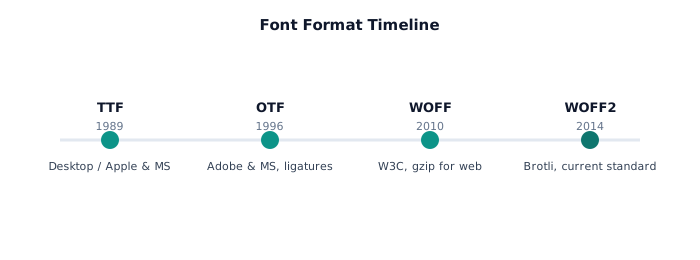
A quick timeline of font formats
TTF, TrueType Font
Developed by Apple and later adopted by Microsoft, TTF is the format most operating systems still ship with by default. It stores glyph outlines as quadratic Bezier curves and works everywhere on desktop. It just isn't compressed, which makes it the heaviest option if you serve it straight to a browser.
OTF, OpenType Font
OTF extended TrueType with backing from Adobe, adding cubic Bezier outlines (the PostScript flavor), advanced typography like ligatures and stylistic alternates, and better cross-platform metadata. Type foundries frequently distribute their premium fonts as OTF specifically because it keeps these professional features intact.
WOFF, Web Open Font Format
WOFF wraps a TTF or OTF in gzip compression and adds metadata built for the web, without changing a single glyph. It became a W3C recommendation in 2010, giving browsers a font format designed for @font-face rather than a repurposed desktop file.
WOFF2, the current web standard
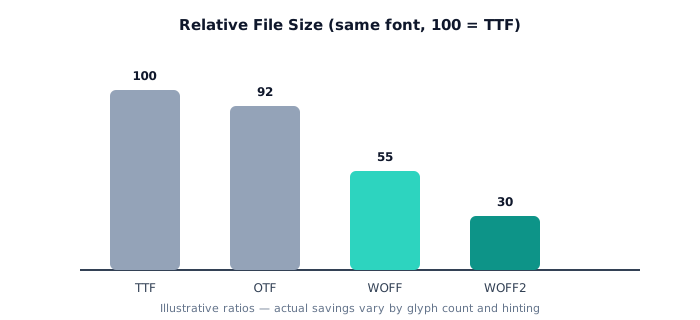
WOFF2 swaps gzip for Google's Brotli compression algorithm, shrinking files further: typically 30% smaller than WOFF, and up to 70% smaller than a raw TTF. Since 2014 it's become the default recommendation for any font served over the web.
Size and support, side by side
| Format | Compression | Best for | Browser support |
|---|---|---|---|
| TTF | None | Desktop, apps | Universal (not web-optimized) |
| OTF | None | Design software, print | Universal (not web-optimized) |
| WOFF | gzip | Legacy browser fallback | ~99% incl. old browsers |
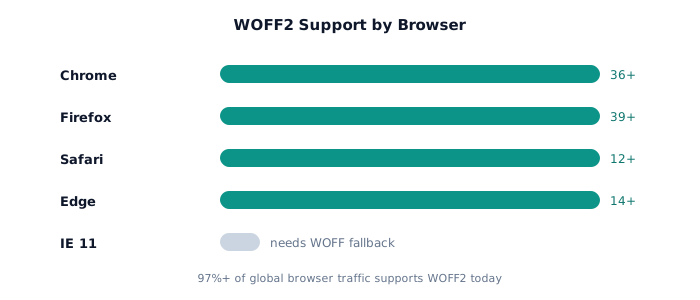
| WOFF2 | Brotli | Modern websites | 97%+ (all current browsers) |
Which format should you actually use?
- Building a website? Use WOFF2. Add a WOFF fallback only if you have to support IE11 or very old mobile browsers.
- Designing in Photoshop, Illustrator, or Figma? Use OTF or TTF, whatever the type foundry gave you.
- Sending a font to a print shop? OTF, depending on what their RIP software expects.
- Got a WOFF2 but need it in a desktop app? Convert it back to TTF. The process is lossless.
Need to switch a font between these formats right now? Drop it into the converter: TTF, OTF, WOFF and WOFF2, free.
Open the Font Converter →Frequently asked questions
- Is WOFF2 always better than TTF or OTF?
- For websites, yes. WOFF2 is smaller and loads faster. For desktop apps, design software, or printing, TTF and OTF are still correct, since that's what those programs expect.
- Can I convert TTF to WOFF2 without losing quality?
- Yes. Converting between TTF, OTF, WOFF and WOFF2 is lossless. It repackages the same glyph outlines and hinting data into a different, more compressed container.
- Do I need both WOFF and WOFF2 on my website?
- For modern audiences WOFF2 alone is usually enough, since support is above 97%. Adding a WOFF fallback only matters if you specifically need very old browser support.
- What's the difference between TTF and OTF outlines?
- TTF uses quadratic Bezier curves. OTF, in its PostScript flavor, uses cubic Bezier curves instead, which is one reason foundries often ship OTF as their primary professional format.