How to Convert TTF to WOFF2 (and Why It Matters)
A four-step conversion, plus the actual page-speed math for why this small file swap is worth doing on every site you ship.
TTF is the format most fonts arrive in, whether from a designer, a marketplace, or your own OS. Shipping a raw .ttf straight to a browser is still one of the easiest, most overlooked page-speed mistakes out there. Converting to WOFF2 first takes under a minute and needs no software install.
The conversion, step by step
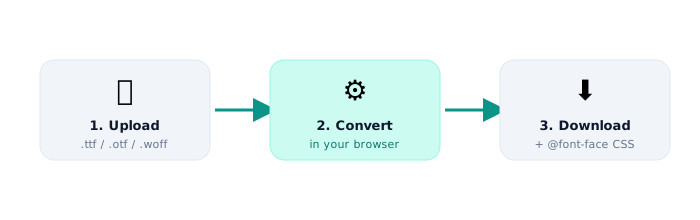
- Upload your TTF. Drag it into the converter, or click to browse for the file.
- Choose WOFF2 as the output. Select WOFF as well if you need a legacy fallback.
- Convert. The conversion happens locally. Your font file is never sent to a server.
- Download and wire up the CSS. Add the
@font-facerule to your stylesheet.
@font-face { font-family: "YourFont"; src: url("yourfont.woff2") format("woff2"); font-display: swap; }
Why this actually matters
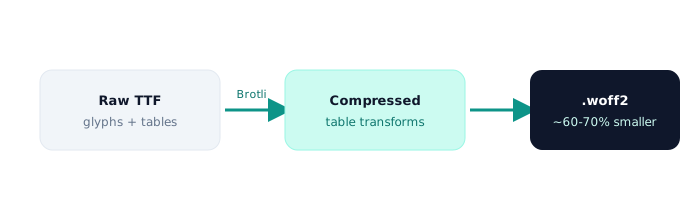
A raw TTF is uncompressed. WOFF2 runs the same glyph data through Brotli compression, which typically cuts file size by 60 to 70% compared to TTF, and around 30% compared to older WOFF. For a page loading three font weights, that difference often adds up to several hundred kilobytes, and it's entirely avoidable.
The effect on Core Web Vitals
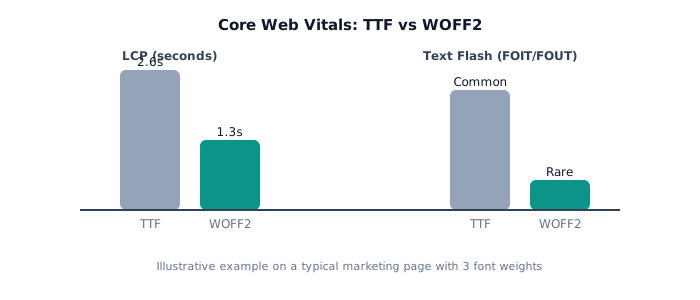
Fonts block text rendering until they download, which directly affects Largest Contentful Paint (LCP) whenever your LCP element is text. Smaller font files also lower the odds of a layout shift when a fallback font swaps out for the real one, which helps Cumulative Layout Shift (CLS) too.
Common mistakes after converting
- Wrong MIME type: some servers still don't serve
.woff2asfont/woff2by default. Check your server config if the font 404s or silently fails. - No
font-displayvalue: addfont-display: swapso text stays visible while the font loads. - Forgetting the fallback: if you support very old browsers, keep a WOFF (not just WOFF2) in your
srclist.
Ready to convert your own TTF right now? It runs entirely in your browser, with no signup and no upload to a server.
Convert TTF to WOFF2 →Frequently asked questions
- Will converting TTF to WOFF2 change how my font looks?
- No. The conversion is lossless. Every glyph outline, kerning pair and hinting instruction is preserved exactly. Only the container and compression change.
- Do I still need the original TTF after converting?
- Keep it. You'll still want the TTF or OTF for design software, and in case you need a different format later.
- Why is my WOFF2 not loading on my website?
- Usually a missing MIME type (
font/woff2) on the server, a wrong path in@font-face src, or a CORS issue when the font is served from a different subdomain or CDN.