Best Font Format for a Website in 2026
Short answer: WOFF2. The longer answer covers the reasoning, the exceptions, and what to do when a client insists on "just give me the TTF".
Font format questions almost always trace back to one thing: where will this file actually run? A website, a desktop app, and a print shop each expect something different, and using the wrong one causes either bloated page weight or a file that simply won't open.
Start here: what are you building?
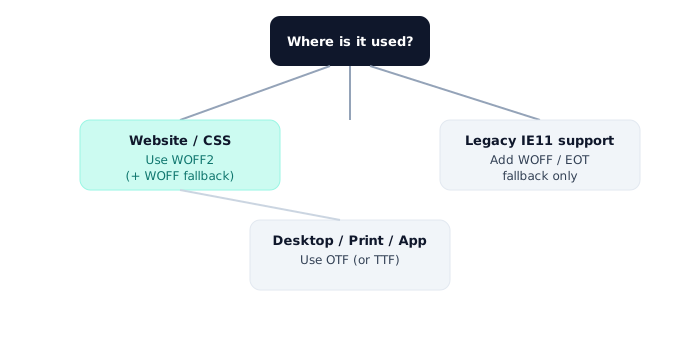
For websites: WOFF2, no real debate
WOFF2's Brotli compression makes it 30% smaller than WOFF and up to 70% smaller than an uncompressed TTF, with support across every browser released in the last several years. Unless you have a specific reason to support Internet Explorer 11, a single WOFF2 file per weight is enough.
For design software and desktop apps: OTF or TTF
Photoshop, Illustrator, Word, and most operating systems expect OTF or TTF, not WOFF2. If a foundry sold you an OTF, keep using it there. Converting it to WOFF2 is only for the web version of your project.
For print: OTF
Most modern print workflows accept OTF fine. Older RIP software at some print shops may still ask for a legacy PostScript format, so it's worth checking before sending files off.
Legacy formats you probably don't need anymore
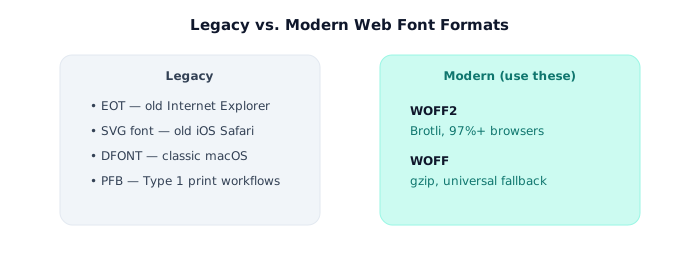
- EOT is only relevant for Internet Explorer versions older than IE9. Most sites can drop it entirely.
- SVG fonts were a workaround for iOS Safari before version 4.2. Not needed today.
- DFONT is Apple's old resource-fork format, occasionally found in very old macOS system fonts.
A simple rule of thumb
<link> or @font-face, use WOFF2. If it's going in a design tool or a printer, use OTF or TTF. Almost nothing needs the legacy formats anymore.Have the wrong format for where you're deploying? Convert between TTF, OTF, WOFF and WOFF2 in seconds, right in your browser.
Open the Font Converter →